Monday, December 22, 2008

Lifehacker v2...

I didn't have the words to describe a not-quite-right feeling I couldn't shake for the new lifehack look - until reading Robin Williams's most excellent "The Non-Designer's Design Book" that is. (Link)

lifehacker

Contrast is what's lacking. (That's contrast of the non-wimpy variety.) The tall vertical banner on the left blends with the horizontal bar at the top, blends with the article headers to the right. The links and summaries are devilishly difficult to distinguish too. (Say that 5 times fast I dares ya!)

With the right amount of contrast - of which size is but one technique, there's also colour, form, direction and weight - a reader should be able to pick up on the different elements of a layout almost immediately with little-to-no effort.

Highly subjective of course. Can you tell I'm not digging the new look? :-)

Sunday, October 26, 2008

Macbooks...

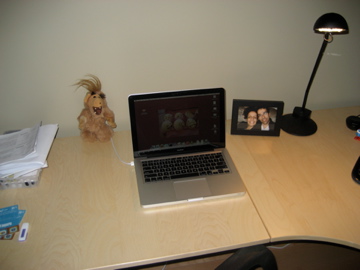
I was kinda waiting on this one for awhile and was it ever worth it! Isn't she beautiful?

IMG_2201.jpg

Small, light, excellent build quality and with a bright, vibrant screen too. I couldn't be happier. So long MS... it was great while it lasted. :-)

Friday, September 5, 2008

Model associations in Cake...

I just bumped into this little trick in a forum post on model associations...


class Recipe extends AppModel {
var $hasOne = 'User';
}

class User extends AppModel {
var $hasMany = 'Recipe';
}
Associations seem to allow ->finds like these:

$this->User->Recipe->find('all', array('conditions' => array('cooking_time <' => '30 mins.'));


Who knew?! This automatically does a Left Join of User on Recipe. Note to self: Find a code snippet formatter/style for Blogspot! :-(

Sunday, August 31, 2008

PHP HereDocs

Look what I found in some random bit of open source php the other day:


$a = <<<END
Hello, World!
Hi ma!
END;


Excellent!

Saturday, July 5, 2008

Notes: PowerPoint is not presentation

From a presentation by Nancy Duarte.

[http://www.vizthink.com/blog/2008/06/18/webinar-creating-powerful-presentations-with-nancy-duarte/]

Telling stories in pictures

Thinking visually
Simplicity
Clarity

Start with open space/empty whiteboard

Perfection achieved when nothing left to take away... not nothing left to add

Presentations as a platform
  Mediums
    projector
    paper
    web
    devices
      interactive
      view
      collab

Need a visual language for your business
  specific artwork
  really resonates with your business

Friday, June 27, 2008

Zoomii.ca

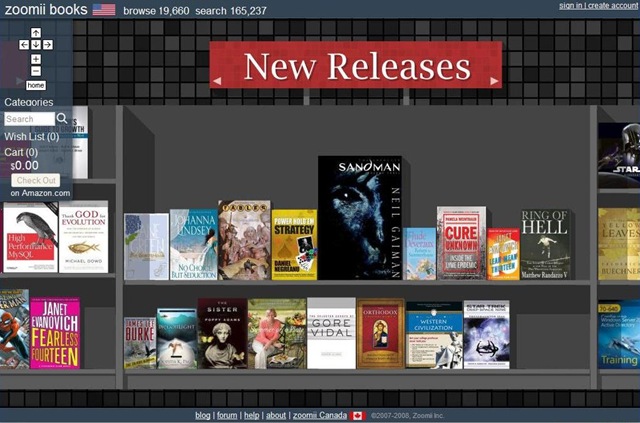
Here's a very neat take on browsing the bookshelves of an online bookstore. The interactions are surprisingly intuitive and very responsive-I actually had fun perusing the fantasy section. When was the last time I perused the catalog of an online store? Let me tell you... it's never happened! I'm either searching for something specific or have been given a direct link. Here's their new releases section:

zoomii-1

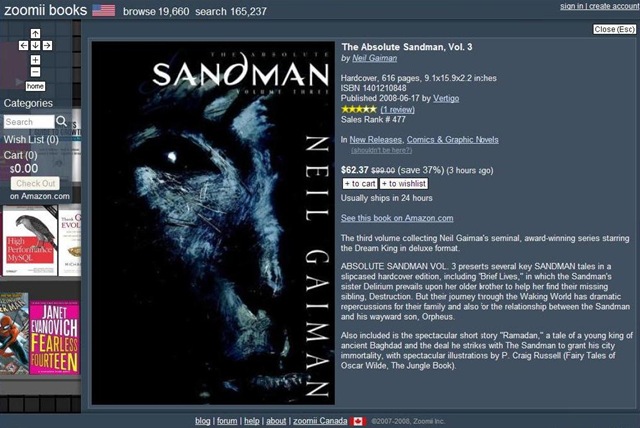
Clicking on a title brings up what you'd expect... detailed product info. direct from Amazon's ginormous book database:

zoomii-2

Way to go guys!!

Tuesday, June 17, 2008

Internet Retailer Conference 2008

"Get Elastic Ecommerce Blog" is quickly becoming one of my fave blogs. (http://www.getelastic.com)

They were down in Chicago last week for the Internet Retailer Conference and have posted a few of the vendor interviews they managed to squeeze in between sessions. :-)

I found Berdine Wu's common-sense advice particularly enlightening. She talked about some of the things any company going online needs to get right to be successful...

  • Search engine optimization/marketing
  • User experience of your website (smooth, few clicks to buy)
  • Clear, crisp imagery
  • Directed email campaigns
  • Branding coming across strongly

Nice.

Sunday, June 15, 2008

Notes: Google I/O State of Ajax

User Experience

Book: Jeff Raskin: The Humane Interface

2 parts:
  Visual design
  Interaction design

User experience expectations have changed dramatically for the web

Google Gears->Gears

Gears Demo 1:
  A neat demo was shown with gears being used as a background
    processing thread
  Common pattern for doing long running tasks
    Spawn a background thread keeps the UI responsive
    Can't really do that in the browser
    Complex Javascript fights repainting... both share same thread
    Gears can do this though!!

Gears Demo 2:
  Form History pattern
    like Time Machine
    Replacement for undo
    Can go back in time to different states of form
    Trying to implement undo is hard (instead of warning dialogs)
      The browser has its own undo stack
      2 dueling undo stacks? -> Confusion

Gears is really amping up responsiveness!

Gears Demo 3:
  Demo-ed a growls like widget for web applications

Unobtrusive Javascript:
  An application that degrades gracefully in environments where
  javascript/ajax might not be available
    Progressive enhancement
  Does your application still work?

Firebug Rocks!!

I was trying to figure out how the site logo at http://www.macsbeer.com/index.php was done so I right clicked it and hit "Inpect Element". (FF3+Firebug1.2.0b3)

Here's what I got from firebug...

firebug

In the style window on the right I quickly found the background image responsible for the nice logo but look what happened when I mouse-d over it!

Fantastic.

Saturday, June 7, 2008

The Dreyfus Model of Learning (Applied to Medicine)

Each and every skill we possess falls into one of the following 5 categories of proficiency...

(1) In the novice stage, the freshman medical student begins to learn the process of taking a history and memorizes the elements, chief complaint, history of the present illness, review of systems, and family and social history.

(2) In the advanced beginner stage, the junior medical student begins to see aspects of common situations, such as those facing hospitalized patients (admission, rounds, discharge) that cannot be defined objectively apart from concrete situations and can only be learned through experience. Maxims emerge from that experience to guide the learner.

(3) In the competent stage, the resident physician learns to plan the approach to each patient’s situation. Risks are involved, but supervisory practices are put in place to protect the patient. Because the resident has planned the care, the consequences of the plan are knowable to the resident and offer the resident an opportunity to learn.

(4) In the proficient stage, the specialist physician early in practice struggles with developing routines that can streamline the approach to the patient. Managing the multiple distracting stimuli in a thoughtful way is intellectually and emotionally absorbing.

(5) In the expert stage, the mid-career physician has learned to recognize patterns of discrete clues and to move quickly, using what he or she might call "intuition" to do the work. The physician is attuned to distortions in patterns or to slow down when things "don’t fit" the expected pattern.

On Craftsmen and Novices...

Here's an excerpt taken from 'A Pattern Language' by Christopher Alexander written more than 30 years ago. A craftsman brings to bear an intuition garnered from years of experience in his work. The novice prefers to follow rules and be told what do to. The craftsman uses abstract concepts and considers context. In the fantastic quote I've included below, Christopher describes the craftsman as being unconcerned with small mis-steps here and there - he knows he can fix them later...


Why does the principle of gradual stiffening seem so sensible as a process of building?

To begin with, such a structure allows the actual building process to be a creative act. It allows the building to be built up gradually. Members can be moved around before they are firmly in place. All those detailed design decisions which can never be worked out in advance on paper, can be made during the building process. And it allows you to see the space in three dimensions as a whole, each step of the way, as more material is added…

The essence of this process is very fundamental indeed. We may understand it best by comparing the work of a fifty-year-old carpenter with the work of a novice. The experienced carpenter keeps going. He doesn’t have to keep stopping, because every action he performs, is calculated in such a way that some later action can put it right to the extent that it is imperfect now. What is critical here, is the sequence of events. The carpenter never takes a step which he cannot correct later; so he can keep working, confidently, steadily.

The novice by comparison, spends a great deal of his time trying to figure out what to do. He does this essentially because he knows that an action he takes now may cause unretractable problems a little further down the line; and if he is not careful, he will find himself with a joint that requires the shortening of some crucial member – at a stage when it is too late to shorten that member. The fear of these kinds of mistakes forces him to spend hours trying to figure ahead: and it forces him to work as far as possible to exact drawings because they will guarantee that he avoids these kinds of mistakes.

The difference between the novice and the master is simply that the novice has not learnt, yet, how to do things in such a way that he can afford to make small mistakes. The master knows that the sequence of his actions will always allow him to cover his mistakes a little further down the line. It is this simple but essential knowledge which gives the work of a master carpenter its wonderful, smooth, relaxed, and almost unconcerned simplicity.

Sunday, May 4, 2008

The BBC wants your feedback

bbc_complaints

Making it easy for disgruntled customers to leave feedback about your product - both positive and negative - is one of the best ways we have as product managers and designers to make it better.

I just stumbled upon BBC's complaints website. (Shown above.) Visitors can learn about the broadcaster's complaints process, file complaints and look to past responses to see how theirs might be handled.

Nice.

Wednesday, April 23, 2008

Paging on Smugmug.com

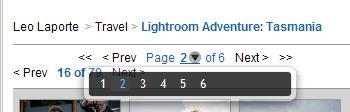
I love the way Smugmug does its paging of large photo albums...

The first page:

page_control-1


The second page:

page_control-2

Look at the nice little overlay control with all 6 pages!


and the last page:

page_control-3

Wednesday, March 26, 2008

Parsing command line args

I love the way it's done in Gant!!

def cli = new CliBuilder ( usage : 'gant [option]* [target]*' , parser : new GnuParser ( ) )
cli.c ( longOpt : 'usecache' , 'Whether to cache the generated class and perform modified checks on the file before re-compilation.' )
cli.d ( longOpt : 'cachedir' , args : 1 , argName : 'cache-file' , 'The directory where to cache generated classes to.' )
cli.f ( longOpt : 'gantfile' , args : 1 , argName : 'build-file' , 'Use the named build file instead of the default, build.gant.' )
cli.h ( longOpt : 'help' , 'Print out this message.' )

cli.l ( longOpt : 'gantlib' , args : 1 , argName : 'library' , 'A directory that contains classes to be used as extra Gant modules,' )
cli.n ( longOpt : 'dry-run' , 'Do not actually action any tasks.' )
cli.p ( longOpt : 'projecthelp' , 'Print out a list of the possible targets.' )
cli.q ( longOpt : 'quiet' , 'Do not print out much when executing.' )
cli.s ( longOpt : 'silent' , 'Print out nothing when executing.' )
cli.v ( longOpt : 'verbose' , 'Print lots of extra information.' )

cli.D ( argName : 'name>=<value' , args : 1 , 'Define <name> to have value <value>.  Creates a variable named <name> for use in the scripts and a property named <name> for the Ant tasks.' )
cli.L ( longOpt : 'lib' , args : 1 , argName : 'path' , 'Add a directory to search for jars and classes.' )
cli.P ( longOpt : 'classpath' , args : 1 , argName : 'path' , 'Specify a path to search for jars and classes.' )
cli.T ( longOpt : 'targets' , 'Print out a list of the possible targets.' )
cli.V ( longOpt : 'version' , 'Print the version number and exit.' )

def options = cli.parse ( args )

parse(args) returns a map you use like so...


if ( options.h ) { cli.usage ( ) ; return 0 }
if ( options.l ) { gantLib << options.l.split ( System.properties.'path.separator' ) }
if ( options.n ) { GantState.dryRun = true }
def function = ( options.p || options.T ) ? 'targetList' : 'dispatch'
if ( options.q ) { GantState.verbosity = GantState.QUIET }
if ( options.s ) { GantState.verbosity = GantState.SILENT }
if ( options.v ) { GantState.verbosity = GantState.VERBOSE }

PS. I'll try to clean this up later... pygments.org looks neat!

Tuesday, March 25, 2008

The Four Stages of Learning

Unconscious incompetence

In the first stage of learning you don't know you're no good - ignorance is bliss! Sometimes this comes from simply having preconceptions about how easy a task is and sometimes it comes from not knowing there's a better way. Dysfunctional teams and developers are often unaware of what they're doing wrong, even if it becomes obvious when scrutinized.

Conscious incompetence

The second stage of learning is the tricky one as it starts to dawn that you're not actually all that good! At this stage, teams and developers need a lot of support to prevent them wallowing in despair and to help them select and adopt new techniques.

Conscious competence

In the third stage of learning you're consciously applying the techniques you need in order to be "good". Here teams and developers know what they should be doing but need their momentum to be maintained, often by external encouragement and review.

Unconscious competence

At the fourth stage of learning you're naturally doing things right.

Monday, March 24, 2008

Interview: Nathan Shedroff

An interview by Kate Rutter with Nathan Shedroff about blending the roles of designer and business analyst in a new program being offered at the California College of the Arts. Brilliant...

[KR]: It seems that a common attribute of similar programs is to blur the boundaries between fields, and to foster the ability to synthesize…to cross-pollinate concepts and ideas across different functional areas. With this trend towards generalization, how do you avoid teaching people to be, for lack of a better phrase, Jack-or-Jane-of-all-trades but master of none?

[NS]: This is a great question. There’s no way we can teach students everything they need to know. We’re specifically looking for passionate individuals who will take what we learn together and apply it to the passions, interests, and experience they already possess. Their learning is life-long so the best we can do is frame some of these perspectives and skills for them, give them some experience, and inspire them to continue the process. We’ve prioritized, in the curriculum, the skills, knowledge, and experiences we think they will need the most, but it’s just a start. Besides, there’s only so much you can learn in school. At some point, you need to learn “on-the-job” — whatever that job may be. So, we’re exposing our students to a variety of skills but with unified perspectives (design-led innovation, meaningful experience, sustainability, and visionary leadership) so that their deep skills will follow these lines. They will be expert innovation leaders and will be able to apply these skills to any domain or challenge.

Sunday, March 23, 2008

Bounded Irrationality or Decision Making Traps

1. Anchoring

When considering a decision, our minds are unduly influenced by the first information we find. Initial impressions and data anchor subsequent judgments.

2. Confirmation

Through selective search and perception, we subconsciously seek data that supports our existing point of view, and avoid contradictory evidence.

3. Memorability

We are overly influenced by recent or dramatic events. Repetition from one or multiple sources can also influence belief, memory, and judgment.

4. Status quo

Decision makers exhibit a strong bias toward conservatism, inertia and alternatives that perpetuate the status quo. We look for reasons to do nothing.

5. Sunk cost

Unwilling, consciously or not, to admit past mistakes, we make decisions in a way that justifies past choices.

From Ambient Findability (pg. 157)

User Experience

Peter Morville's definition of user experience is broader than most but I like the direction he takes it in... (His book Ambient Findability is fantastic btw.)

1. Useful

As practitioners we can't be content to paint within the lines drawn by managers. we must have the courage and creativity to ask whether our products and systems are useful, and to apply our deep knowledge of craft and medium to define innovative solutions that are more useful.

2. Usable

Ease of use remains vital, and yet the interface-centered methods and perspectives of human-computer interaction do not address all dimensions of web design. In short, usability is necessary but not sufficient.

3. Desirable

Our quest for efficiency must be tempered by an appreciation for the power and value of image, identity, brand and other elements of emotional design.

4. Findable

We must strive to design navigable web sites and locatable objects, so users can find what they need.

5. Accesible

Just as our buildings have elevators and ramps, our web sites should be accessible to people with disabilities (more than 10% of the population). today, it's good business and the ethical thing to do. Eventually, it will become the law. Standards-based design for accessibility also supports access via mobile devices.

6. Credible

Thanks to some ground-breaking research out of Stanford's Persuasive Technologies Lab, we're beginning to understand the design elements that influence whether users trust and believe what we tell them.

7. Valuable

Finally, it's not just about the user. Our sites must deliver value to our sponsors. For non-profits, the user experience must advance the mission. With for-profits, it must contribute to the bottom line and improve customer satisfaction.

From Ambient Findability (pg. 109)

Saturday, March 1, 2008

Information Hierarchies

It really is amazing the amount of information most people can absorb quickly if it's organized effectively. The 2 screens linked below illustrate this...

Yahoo Desktop1:

before-page-hierarchy

Yahoo Desktop2:

after-page-hierarchy

Differences between the first and second screens:

- 4 main content groupings: the search field, sidebar, main content area and tag cloud

- Data grouped to align with user goals like music, photos and documents

- Icons are used effectively to break up the different groups with the main content area

- Even fonts are used to group similar items with categories

[Proximity, shape, size and colour are all examples of some of the visual cues we'll use to group related things together.]

Sunday, February 24, 2008

H&R Block's Tango

H&R Block has taken their tax preparation offering in a radically new direction this year for your 2006 returns. Enter project Tango...

tango tax prep software making-of story-2

It runs in a browser like Firefox (shown above), but they've re-jigged the experience by getting rid of back/forward, refresh, et. al. Very slick!

Check out their making of video: "The Journey Continues...". It feels like I'm reading an interactive comic book.

tango tax prep software making-of story

[Link: http://hrblock.com/tango/thejourney.html]

User Stories

Def'n: "Those that are familiar with Agile approaches to software development are also familiar with the idea of a user story being a deliverable unit of business value within the context of a system."

[Link: http://studios.thoughtworks.com/2008/2/19/forest-for-the-trees]